Tấn Phát Digital — Bài viết được biên dịch và Việt hóa từ tài liệu chính thức "Understanding page experience in Google Search results" của Google Search Central. Đây là bài tổng quan về Page Experience — concept Google dùng để đánh giá toàn diện trải nghiệm trang web.
Page Experience — Khái niệm bị hiểu sai nhất tại VN
Tại Việt Nam, có 3 nhóm "thầy SEO" hiểu sai về Page Experience:
Nhóm 1: "Page Experience = Core Web Vitals"
❌ Sai. Core Web Vitals chỉ là một phần của Page Experience.
Nhóm 2: "Page Experience là ranking factor số 1"
❌ Sai. Google nói rõ: "There is no single signal cho page experience ranking."
Nhóm 3: "Cần tối ưu Lighthouse 100/100"
❌ Sai. Google nói: "Trying to get a perfect score just for SEO reasons may NOT be the best use of your time."
Vậy Page Experience thực sự là gì? Có quan trọng cho SEO không? Cách tối ưu đúng?
Bài viết này, Tấn Phát Digital sẽ giải mã toàn bộ sự thật về Page Experience theo Google chính thức.
Bài viết này dành cho:
UX Designer muốn hiểu SEO impact
Product Manager cần định hướng UX
SEO Specialist muốn hiểu beyond Core Web Vitals
Chủ website cân nhắc đầu tư UX
Phần 1: Page Experience là gì?
1.1. Định nghĩa từ Google
Google nói:
"Google's core ranking systems look to REWARD content that provides a GOOD PAGE EXPERIENCE."
🎯 Translation:
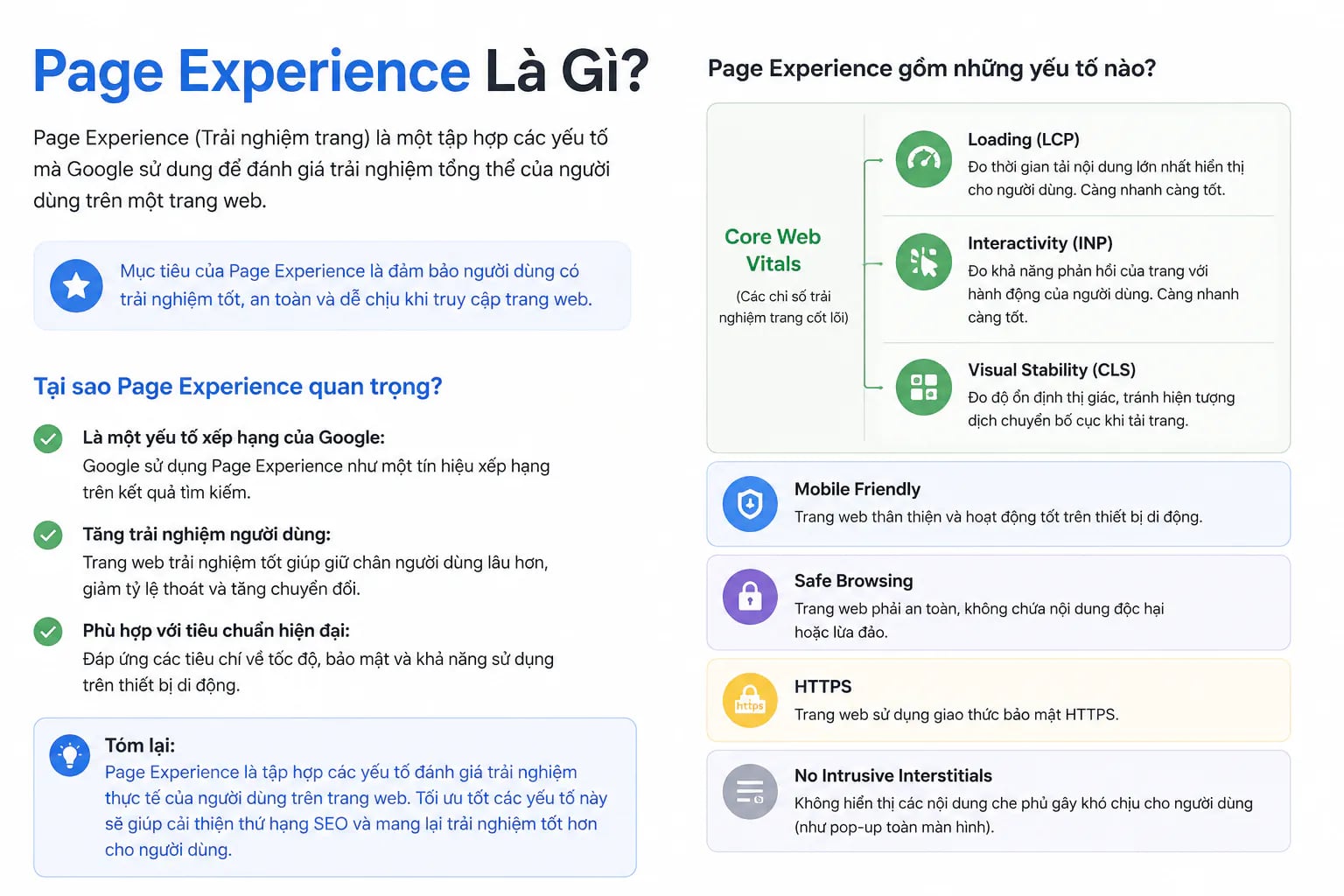
Page Experience = Tổng hợp các yếu tố đánh giá trải nghiệm tổng thể của user khi tương tác với trang web.
1.2. Page Experience BAO GỒM những gì?
Google không định nghĩa cố định, nhưng list 6 aspects chính:
📊 PAGE EXPERIENCE FRAMEWORK
⚡ 1. Core Web Vitals (LCP, INP, CLS)
🔒 2. HTTPS Security
📱 3. Mobile-Friendliness
🚫 4. Intrusive Interstitials
🎨 5. Ad Placement
📝 6. Content Distinction
1.3. Cảnh báo quan trọng từ Google
Google nhấn mạnh:
"Site owners seeking to be successful with our systems should NOT FOCUS ON ONLY ONE OR TWO ASPECTS of page experience. Instead, check if you're providing an OVERALL great page experience."
🎯 Translation:
❌ Không focus chỉ vào 1-2 metrics ✅ Optimize toàn diện mọi aspects
→ Site có Core Web Vitals tốt nhưng UX tệ ở các điểm khác = vẫn xếp hạng kém.
Phần 2: 6 câu hỏi tự đánh giá Page Experience
Google đưa ra 6 câu hỏi self-assessment. Trả lời "YES" với mọi câu = Page Experience tốt.
Câu hỏi 1: Core Web Vitals tốt?
"Do your pages have good Core Web Vitals?"
Tiêu chuẩn:
LCP < 2.5s
INP < 200ms
CLS < 0.1
→ Chi tiết tại Bài 22 — Core Web Vitals.
Câu hỏi 2: HTTPS secure?
"Are your pages served in a SECURE FASHION?"
Yêu cầu:
HTTPS bắt buộc
SSL certificate valid
No mixed content warnings
Modern TLS protocols
Setup HTTPS:
# Nginx - Force HTTPS
server {
listen 80;
server_name example.com;
return 301 https://$host$request_uri;
}
server {
listen 443 ssl http2;
server_name example.com;
ssl_certificate /path/to/cert.pem;
ssl_certificate_key /path/to/key.pem;
# Modern SSL config
ssl_protocols TLSv1.2 TLSv1.3;
ssl_ciphers HIGH:!aNULL:!MD5;
ssl_prefer_server_ciphers on;
# HSTS
add_header Strict-Transport-Security "max-age=31536000; includeSubDomains" always;
}
Câu hỏi 3: Mobile-friendly?
"Does your content display WELL ON MOBILE DEVICES?"
→ Chi tiết tại Bài 23 — Mobile-First Indexing.
Câu hỏi 4: Excessive ads?
"Does your content AVOID USING AN EXCESSIVE AMOUNT OF ADS that distract from or interfere with main content?"
Bad examples:
❌ Ads chiếm 50%+ above-the-fold
❌ Pop-up ads full-screen liên tục
❌ Auto-play video ads
❌ Sticky ads che content
❌ More ads than content
Good examples:
✅ Ads trong sidebar (desktop)
✅ Native ads in-flow
✅ Smaller banners
✅ Easily skippable
✅ Content > Ads ratio
Câu hỏi 5: Intrusive interstitials?
"Do your pages AVOID USING INTRUSIVE INTERSTITIALS?"
🚨 Đây là vấn đề lớn của site VN!
Intrusive interstitials = Pop-ups can content.
Bad examples:
❌ Pop-up full-screen "Subscribe now!"
❌ Modal "10% off" che main content
❌ Age verification full-screen
❌ App install banner che 30%+ màn hình
❌ Cookie consent block content
Good examples:
✅ Small banner top/bottom
✅ Cookie consent compact
✅ Newsletter signup in-content
✅ Exit-intent popup (desktop only)
✅ Legal requirements (with skip)
⚠️ Cảnh báo: Google CÓ THỂ phạt site có intrusive interstitials → drop ranking.
Câu hỏi 6: Main content distinguishable?
"Is your page DESIGNED SO VISITORS CAN EASILY DISTINGUISH the main content from other content?"
Bad design:
❌ Ads trộn lẫn với content
❌ Navigation chiếm hầu hết viewport
❌ Sidebar che main content
❌ Affiliate links khắp nơi
❌ Pop-ups liên tục
Good design:
✅ Main content prominent
✅ Clear visual hierarchy
✅ Whitespace adequate
✅ Typography readable
✅ Clear CTAs
Phần 3: FAQ chính thức từ Google
Google trả lời 4 câu hỏi quan trọng:
Q1: Có "page experience signal" duy nhất không?
Google answer:
"There is NO SINGLE SIGNAL. Our core ranking systems look at a VARIETY OF SIGNALS that align with overall page experience."
🎯 Implication:
Không có "1 metric" để focus
Cần optimize multiple signals
Holistic approach
Q2: Aspects nào được dùng cho ranking?
Google answer:
"CORE WEB VITALS are used by our ranking systems. Beyond Core Web Vitals, OTHER PAGE EXPERIENCE ASPECTS DON'T DIRECTLY help your website rank higher."
🎯 Insight quan trọng:
Direct ranking factor: Core Web Vitals ⭐
Indirect (vẫn quan trọng):
HTTPS
Mobile-friendly
Interstitials
Ad placement
Content distinction
→ "Indirect" không nghĩa là không quan trọng. Google nói:
"They can make your website more satisfying to use, which is GENERALLY ALIGNED with what our ranking systems seek to reward."
Q3: Page experience evaluated site-wide hay page-specific?
Google answer:
"Our core ranking systems generally evaluate content on a PAGE-SPECIFIC basis... However, we do have SOME SITE-WIDE ASSESSMENTS."
🎯 Implication:
Mỗi page có score riêng
Một số signals áp dụng site-wide (HTTPS, mobile)
Không phải "1 trang tệ = toàn site bị phạt"
Q4: Page experience quan trọng cỡ nào cho ranking?
Google answer:
"Google Search ALWAYS SEEKS to show the MOST RELEVANT content, EVEN IF the page experience is SUB-PAR."
"But for many queries, there is lots of helpful content available. Having a great page experience CAN CONTRIBUTE TO SUCCESS in Search."
🎯 Translation:
Page Experience KHÔNG override Relevance.
Priority cho Google:
1. Relevance (Content match query) - QUAN TRỌNG NHẤT
2. E-E-A-T - Quan trọng
3. Page Experience - Tiebreaker
→ Content tệ + UX tốt < Content tốt + UX tệ < Content tốt + UX tốt
Phần 4: Cảnh báo Lighthouse 100/100
Đây là misconception lớn nhất tại VN.
4.1. Google warning rõ ràng
Google nói:
"Getting good results in reports like Search Console's Core Web Vitals report or THIRD-PARTY TOOLS DOESN'T GUARANTEE that your pages will rank at the top of Google Search results."
"Trying to get a PERFECT SCORE just for SEO reasons MAY NOT BE THE BEST USE of your time."
🎯 Translation:
❌ Lighthouse 100/100 ≠ Top 1 Google
❌ Focus chỉ vào perfect score = waste time
✅ Focus vào real user experience
4.2. Sự khác biệt Lab vs Field data
🧪 LAB DATA (Lighthouse):
- Test trong controlled environment
- Có thể optimize "hack" cho điểm cao
- Không phản ánh real users
- KHÔNG dùng cho ranking
🌍 FIELD DATA (CrUX):
- Real users, real conditions
- Reflects actual experience
- DÙNG cho ranking
- Khó "fake"
→ Site có thể Lighthouse 100 nhưng CrUX tệ → vẫn xếp hạng kém.
4.3. Cách approach đúng
Tiêu chuẩn pragmatic:
✅ Core Web Vitals trong "Good" range
✅ Mobile-friendly (pass Lighthouse mobile)
✅ HTTPS implemented
✅ No intrusive interstitials
✅ Reasonable ad placement
→ Đủ cho 90% sites
Cố perfect score chỉ khi:
Site enterprise với traffic > 1M/tháng
Direct ROI từ performance
Có dedicated team
Phần 5: Tools đánh giá Page Experience
5.1. Core Web Vitals report (Search Console)
Vị trí: Search Console → Experience → Core Web Vitals
Hiển thị:
Mobile + Desktop
Good / Needs Improvement / Poor pages
Trend over time
Examples URLs
⭐ Đây là data Google dùng cho ranking.
5.2. HTTPS report
Vị trí: Search Console → Experience → HTTPS
Hiển thị:
HTTPS pages count
Non-HTTPS issues
Mixed content warnings
5.3. Lighthouse (Chrome DevTools)
Cách dùng:
1. Open DevTools (F12)
2. Tab "Lighthouse"
3. Categories:
✅ Performance
✅ Accessibility
✅ Best Practices
✅ SEO
4. Device: Mobile (default cho ranking)
5. Click "Analyze"
Categories breakdown:
Performance (90+ là tốt)
Core Web Vitals
Speed Index
Time to Interactive
Accessibility (90+ là tốt)
Color contrast
Alt text
ARIA labels
Keyboard navigation
Best Practices (90+ là tốt)
HTTPS
Modern APIs
Console errors
Image aspect ratios
SEO (90+ là tốt)
Meta tags
Crawlable
Structured data
Robots.txt valid
5.4. PageSpeed Insights
URL: https://pagespeed.web.dev
Combines:
Lab data (Lighthouse)
Field data (CrUX)
Specific recommendations
→ Best tool cho tổng quan.
5.5. WebPageTest
URL: https://www.webpagetest.org
Features:
Multiple locations test
Different devices
Connection throttling
Waterfall charts
Filmstrip view
5.6. Chrome User Experience Report (CrUX)
API: https://chromeuxreport.googleapis.com
Data source:
Real Chrome users
Anonymous aggregate
28-day rolling window
Phần 6: Intrusive Interstitials — Vấn đề lớn của site VN
6.1. Định nghĩa
Interstitial = Lớp UI che main content.
Intrusive = Khó skip, gây bực mình, che content user cần.
6.2. Google's specific guidelines
Google có document riêng về interstitials. 3 patterns BAD:
Pattern 1: Pop-up che main content
[Main page content]
↓
[FULL-SCREEN POP-UP]
"Đăng ký nhận newsletter!"
[X Close]
↓
[User bị che content]
❌ Đây là intrusive.
Pattern 2: Standalone interstitial
User clicks search result
↓
[FULL-PAGE INTERSTITIAL]
"Welcome! Continue to article?"
[Continue]
↓
[Actual content]
❌ Block user access.
Pattern 3: Above-the-fold layout
[Banner: 30% screen]
"Get our app!"
↓
[Main content squeezed below]
❌ Content khó tìm.
6.3. 3 patterns OK
Google list 3 exceptions:
Exception 1: Legal requirements
✅ Age verification (alcohol, gambling)
✅ Cookie consent (GDPR, CCPA)
✅ Privacy notices
Exception 2: Login walls cho private content
✅ Premium content paywall
✅ Member-only sections
✅ Subscription sites
Exception 3: Banners chiếm reasonable space
✅ App install banner < 15% screen
✅ Newsletter signup small
✅ Cookie banner compact
6.4. Best practices implementation
Cookie consent:
<!-- Compact bottom banner -->
<div id="cookie-consent"
style="position: fixed; bottom: 0; left: 0; right: 0;
background: #fff; padding: 1rem;
border-top: 1px solid #ddd;
z-index: 1000;">
<p>Chúng tôi dùng cookies.
<a href="/privacy">Chi tiết</a></p>
<button onclick="acceptCookies()">Đồng ý</button>
<button onclick="declineCookies()">Từ chối</button>
</div>
Newsletter signup:
<!-- In-content, not popup -->
<section class="newsletter-signup">
<h3>Nhận tin mới hàng tuần</h3>
<form>
<input type="email" required>
<button>Đăng ký</button>
</form>
</section>
Exit-intent (desktop only):
// Only show on desktop, only when leaving
if (window.innerWidth > 1024) {
document.addEventListener('mouseout', function(e) {
if (e.clientY < 0 && !hasShownPopup) {
showExitIntentPopup();
hasShownPopup = true;
}
});
}
Phần 7: Page Experience cho ecommerce VN
Ecommerce có đặc thù về Page Experience:
7.1. Common issues của ecommerce VN
Issue 1: Product images chậm load
Symptoms:
- 20+ images mỗi product page
- Mỗi image 500KB+
- LCP > 4s
Solutions:
- WebP/AVIF format
- Lazy loading
- CDN
- Multiple sizes (responsive)
- Compression
Issue 2: Checkout interstitials
Symptoms:
- Pop-up "Còn 10 phút!" tạo urgency
- Modal "Đăng ký giảm 10%" cản trở
- Forced account creation
Solutions:
- Bỏ artificial urgency
- Newsletter trong page (không popup)
- Guest checkout option
Issue 3: Slick sliders trên mobile
Symptoms:
- Auto-rotating sliders trên mobile
- Heavy JS slider libraries
- CLS issues
Solutions:
- Static hero trên mobile
- Lightweight sliders
- Specify dimensions
7.2. Ecommerce-specific best practices
✅ Trust signals visible
- SSL certificate hiển thị
- Payment logos
- Customer reviews
- Return policy clear
✅ Easy navigation
- Clear category structure
- Search prominent
- Breadcrumbs
- Recently viewed
✅ Fast checkout
- Guest checkout
- Auto-fill enabled
- Payment options clear
- Progress indicator
Phần 8: Page Experience cho content sites
Blog, news, educational sites có patterns khác:
8.1. Common issues
Issue 1: Too many ads
Symptoms:
- Ads top, middle, bottom, sidebar
- Pop-ups every visit
- Auto-play video ads
Impact:
- High bounce rate
- Low time on site
- Poor mobile experience
Solutions:
Native ads, not banners
Max 2-3 ads per page (mobile)
No auto-play
Skip-able ads
Issue 2: Subscribe/Newsletter prompts
Symptoms:
- Pop-up after 5 seconds
- Slide-in on every page
- Multiple newsletter prompts
Better approach:
- 1 prompt per session
- After significant scroll
- Inline opportunities
Issue 3: Related content spam
❌ "You won't believe what happened next!"
❌ Affiliate links khắp nơi
❌ Recommended widgets nặng
✅ Genuine related content
✅ Editorial recommendations
✅ Lightweight implementation
Phần 9: Checklist Page Experience toàn diện
Section 1: Core Web Vitals
[ ] LCP < 2.5s (mobile + desktop)
[ ] INP < 200ms
[ ] CLS < 0.1
[ ] Pass cho 75% URLs trên Search Console
Section 2: Security
[ ] HTTPS bắt buộc
[ ] Valid SSL certificate
[ ] No mixed content
[ ] HSTS enabled
[ ] Modern TLS protocols
Section 3: Mobile
[ ] Responsive design
[ ] Same content desktop ↔ mobile
[ ] Touch targets ≥ 44px
[ ] Font size ≥ 16px
[ ] No horizontal scroll
[ ] Viewport meta tag
Section 4: Ads
[ ] No auto-play video ads
[ ] Ads < 30% above-the-fold
[ ] Native ads preferred
[ ] Better Ads Standards compliant
[ ] Easy to identify ads
Section 5: Interstitials
[ ] No full-screen popups
[ ] Cookie consent compact
[ ] Newsletter in-content (not popup)
[ ] App banner < 15% screen
[ ] Skip-able if any
Section 6: Content
[ ] Main content prominent
[ ] Clear visual hierarchy
[ ] Adequate whitespace
[ ] Readable typography
[ ] Clear CTAs
[ ] Easy navigation
Section 7: Accessibility
[ ] Alt text cho images
[ ] Proper heading hierarchy
[ ] Color contrast 4.5:1
[ ] Keyboard navigation
[ ] ARIA labels
[ ] Skip-to-content link
Phần 10: Roadmap improving Page Experience
Phase 1: Audit (Week 1)
Tools:
- Lighthouse (Chrome DevTools)
- PageSpeed Insights
- Search Console reports
- Manual review
Output:
- Issue list prioritized
- Quick wins identified
- Long-term roadmap
Phase 2: Quick wins (Week 2-3)
Easy fixes:
- HTTPS migration (nếu chưa)
- Remove intrusive popups
- Fix obvious mobile issues
- Optimize images
- Defer non-critical scripts
Phase 3: Core optimizations (Month 2)
Medium effort:
- Improve Core Web Vitals
- Optimize CSS delivery
- Reduce JavaScript
- Implement caching
- CDN setup
Phase 4: Advanced (Month 3+)
Complex projects:
- Code splitting
- SSR/SSG migration
- Database optimization
- Custom monitoring
- A/B testing setup
Phase 5: Maintain (Ongoing)
Continuous:
- Weekly Search Console check
- Monthly Lighthouse audits
- Quarterly comprehensive review
- User feedback collection
- Performance budgets
Kết luận: Page Experience — Investment dài hạn
Page Experience không phải "checklist 1 lần" — đó là mindset và investment liên tục vào user experience.
5 thông điệp cuối
1. KHÔNG có "single signal". Optimize multiple aspects.
2. Relevance > Page Experience. Content tốt vẫn quan trọng nhất.
3. Field data > Lab data. Real users > Lighthouse score.
4. Page-specific evaluation. Mỗi trang được đánh giá riêng.
5. UX tốt = SEO tốt (long-term).
Tài liệu tham khảo
Về Tấn Phát Digital
Tấn Phát Digital chuyên Page Experience optimization:
UX Audit cho SEO
Page Experience Improvements
Conversion Rate Optimization (CRO)
Mobile UX Consulting
Performance Monitoring
Liên hệ Tấn Phát Digital để improve cả SEO và UX song song.
Biên soạn từ Google Search Central, 10/12/2025. Phần phân tích và Việt hóa thuộc về Tấn Phát Digital.
Page Experience không chỉ là một yếu tố SEO mà còn là nền tảng để xây dựng trải nghiệm tốt hơn cho khách hàng.
Nếu bạn muốn tối ưu tốc độ, UX/UI và hiệu suất website theo tiêu chuẩn Google, hãy liên hệ Tấn Phát Digital để được tư vấn giải pháp phù hợp.