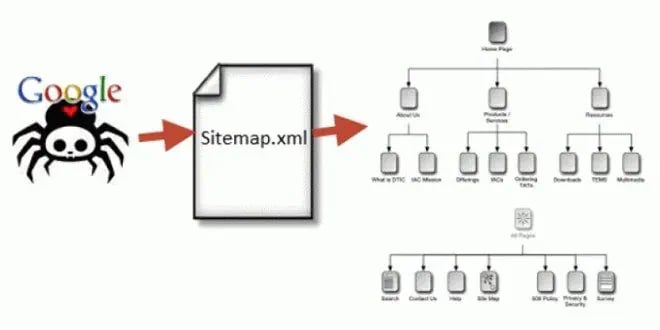
Nếu robots.txt nói với Google được đi đâu, thì sitemap nói với Google có những gì đáng xem.
Đây là một file liệt kê các trang trên website của bạn, giúp công cụ tìm kiếm phát hiện chúng nhanh hơn — đặc biệt hữu ích với các trang mới hoặc trang ít có liên kết trỏ về.
Nhưng cũng như robots.txt, sitemap bị hiểu sai khá nhiều. Nhiều người nghĩ chỉ cần đưa một trang vào sitemap là nó sẽ được Google lưu và xếp hạng. Thực tế không phải vậy — và hiểu đúng điều này giúp bạn không tốn công vô ích.
Bài viết này giải thích sitemap làm gì (và không làm gì), cách tạo và gửi, nên đưa trang nào vào, loại trang nào ra, cùng những lỗi phổ biến khiến sitemap mất tác dụng.
Sitemap làm gì?
Sitemap là một file (thường ở định dạng XML) chứa danh sách các địa chỉ trang trên website của bạn, kèm một số thông tin bổ sung như thời điểm cập nhật gần nhất.
Chức năng chính: giúp công cụ tìm kiếm phát hiện các trang của bạn.
Bình thường, bot tìm thấy trang mới bằng cách đi theo các liên kết. Sitemap là cách nói trực tiếp: "đây là danh sách các trang của tôi, bạn không cần phải tự mò ra".
Đặc biệt hữu ích khi:
Website mới, chưa có nhiều liên kết từ bên ngoài
Trang mới đăng, chưa có liên kết nội bộ trỏ về
Website lớn với cấu trúc sâu, một số trang khó tiếp cận
Trang có ít liên kết trỏ về
Cách kiểm tra website bạn đã có chưa: thử gõ địa chỉ website kèm /sitemap.xml. Nhiều hệ quản trị nội dung tạo tự động ở đó. Nếu không thấy, kiểm tra trong file robots.txt — thường có dòng chỉ đến sitemap.
Điều quan trọng: sitemap không đảm bảo được lập chỉ mục
Đây là hiểu lầm phổ biến nhất.
Nhiều người nghĩ: đưa trang vào sitemap là Google sẽ lưu nó.
Thực tế: sitemap chỉ là lời gợi ý, không phải lệnh. Google vẫn tự quyết định trang nào đáng lưu dựa trên chất lượng nội dung, tầm quan trọng của trang, và nhiều yếu tố khác.
Hệ quả thực tế quan trọng: nếu một trang không được lập chỉ mục, việc thêm nó vào sitemap hiếm khi giải quyết được vấn đề. Nguyên nhân thật thường là nội dung chưa đủ giá trị, hoặc không có liên kết nội bộ nào trỏ về nó.
Cách nghĩ đúng: sitemap giúp Google tìm thấy trang nhanh hơn, nhưng không giúp trang được chọn. Muốn được chọn, trang cần đủ giá trị và có tín hiệu về tầm quan trọng — mà tín hiệu mạnh nhất bạn kiểm soát được là liên kết nội bộ.
Các nguyên nhân khiến trang không được lập chỉ mục được phân tích trong bài vì sao từ khóa mãi không lên top.
Nên đưa trang nào vào sitemap?
Nguyên tắc vàng: sitemap chỉ nên chứa các trang bạn MUỐN xuất hiện trên Google.
Nghe đơn giản nhưng rất nhiều sitemap vi phạm nguyên tắc này.
Nên có:
Trang chủ
Các trang dịch vụ, sản phẩm
Bài viết có giá trị
Trang giới thiệu, liên hệ
Các trang danh mục quan trọng
Không nên có:
Trang bị chặn lập chỉ mục. Nếu bạn đã đặt thẻ noindex cho một trang, đưa nó vào sitemap là mâu thuẫn — bạn vừa nói "đừng lưu" vừa nói "đây, xem đi".
Trang chuyển hướng. Địa chỉ cũ đã chuyển sang địa chỉ mới không nên còn trong sitemap.
Trang lỗi. Địa chỉ không còn tồn tại.
Trang trùng lặp. Nếu có nhiều địa chỉ dẫn đến cùng nội dung, chỉ nên đưa địa chỉ chính vào.
Trang bị chặn trong robots.txt. Mâu thuẫn tương tự — bạn chặn bot vào nhưng lại liệt kê trang đó.
File không phải trang web. Đây là lỗi thực tế khá phổ biến: đưa các file văn bản, tài liệu kỹ thuật vào sitemap dành cho trang HTML. Chúng không phải trang web nên Google không lập chỉ mục — và chỉ làm nhiễu báo cáo, khiến bạn tưởng có vấn đề trong khi không có.
Trang chất lượng thấp. Nếu bạn biết một trang mỏng, không có giá trị, đưa vào sitemap không giúp gì mà còn gửi tín hiệu rằng bạn coi đó là nội dung đáng xem.
Cách tạo sitemap
Với hệ quản trị nội dung phổ biến
Phần lớn nền tảng hiện nay tạo sitemap tự động, hoặc có sẵn thành phần bổ sung làm việc đó. Đây là cách nên dùng vì:
Tự động cập nhật khi bạn thêm hoặc xóa trang
Ít rủi ro sai sót
Không cần can thiệp thủ công
Việc cần làm: kiểm tra cấu hình xem nó đang đưa những loại trang nào vào. Nhiều thành phần bổ sung mặc định đưa cả các trang bạn không muốn (trang thẻ, trang tác giả, trang lưu trữ theo ngày) — nên rà soát và loại bớt.
Với website tự xây
Cần tạo và cập nhật sitemap qua mã nguồn hoặc công cụ. Điểm quan trọng: phải cập nhật tự động khi nội dung thay đổi, nếu không sitemap sẽ nhanh chóng lỗi thời.
Với website nhiều trang
Có giới hạn về số địa chỉ trong một file sitemap. Website lớn nên chia thành nhiều sitemap theo nhóm (một cho bài viết, một cho sản phẩm, một cho trang dịch vụ), rồi dùng một file chỉ mục sitemap liệt kê chúng.
Lợi ích ngoài kỹ thuật: khi chia theo nhóm, báo cáo trong Search Console cũng tách theo nhóm — bạn biết được nhóm nào đang có vấn đề lập chỉ mục thay vì chỉ thấy một con số tổng.
Cách gửi sitemap cho Google
Có hai cách, nên làm cả hai:
Cách 1: Khai báo trong robots.txt. Thêm một dòng chỉ đến địa chỉ sitemap. Cách này giúp mọi công cụ tìm kiếm đều tìm thấy.
Cách 2: Gửi qua Google Search Console. Vào mục Sitemap, nhập địa chỉ sitemap và gửi. Cách này cho bạn báo cáo chi tiết — biết Google đọc được bao nhiêu địa chỉ, có lỗi gì không.
Sau khi gửi: không cần gửi lại mỗi lần cập nhật nội dung. Google sẽ tự kiểm tra sitemap định kỳ. Chỉ cần gửi lại nếu bạn đổi địa chỉ sitemap hoặc chia lại cấu trúc.
Đọc báo cáo trong Search Console
Sau khi gửi, Search Console cho bạn thông tin đáng giá.
Trong mục Sitemap, bạn thấy:
Trạng thái đọc file (thành công hay có lỗi)
Số địa chỉ Google phát hiện được trong sitemap
Thời điểm đọc gần nhất
Trong báo cáo lập chỉ mục, bạn thấy:
Bao nhiêu trang đã được lập chỉ mục
Bao nhiêu trang không được, và lý do cụ thể
Cách diễn giải khoảng chênh lệch:
Nếu sitemap có 200 địa chỉ nhưng chỉ 120 trang được lập chỉ mục, đó không nhất thiết là vấn đề — Google luôn chọn lọc. Nhưng nếu chênh lệch rất lớn, cần xem lý do.
Các lý do thường gặp và ý nghĩa:
Lý do báo | Ý nghĩa | Việc cần làm |
|---|---|---|
Đã thu thập, chưa lập chỉ mục | Google đã đọc nhưng chưa thấy đủ giá trị | Cải thiện nội dung, thêm liên kết nội bộ |
Đã phát hiện, chưa thu thập | Biết trang tồn tại nhưng chưa vào xem | Thường cần thời gian; thêm liên kết nội bộ giúp ưu tiên |
Bị loại bởi thẻ noindex | Trang có thẻ chặn | Nếu cố ý, hãy gỡ trang khỏi sitemap; nếu vô tình, gỡ thẻ |
Bị chặn bởi robots.txt | Mâu thuẫn giữa hai file | Xem lại cấu hình robots.txt |
Trang trùng lặp | Có địa chỉ khác chứa nội dung tương tự | Gộp nội dung hoặc chỉ định địa chỉ chính |
Không tìm thấy (lỗi 404) | Địa chỉ trong sitemap không tồn tại | Cập nhật sitemap, loại địa chỉ cũ |
Cách kiểm tra hàng loạt cho nhiều trang có trong bài kiểm tra index URL hàng loạt.
Bảo trì sitemap
Sitemap không phải làm một lần rồi quên. Vài việc nên làm định kỳ:
Kiểm tra sitemap có cập nhật không. Mở file và xem các trang mới nhất có trong đó chưa. Nếu sitemap dừng cập nhật (thường do lỗi kỹ thuật), Google sẽ chậm phát hiện nội dung mới.
Rà soát các địa chỉ không nên có. Sau một thời gian, sitemap thường tích tụ các địa chỉ đã chuyển hướng, đã xóa, hoặc bị chặn. Dọn định kỳ giúp báo cáo sạch và Google không lãng phí công thu thập.
Kiểm tra sau mỗi thay đổi lớn. Đặc biệt sau khi: làm mới website, đổi cấu trúc địa chỉ, chuyển hosting, gộp hoặc xóa nội dung.
Theo dõi báo cáo lập chỉ mục hằng tháng. Nếu số trang được lập chỉ mục giảm bất thường, đó là dấu hiệu sớm của vấn đề kỹ thuật.
Đây nên là hạng mục trong quy trình chăm sóc, bảo trì website định kỳ.
Sitemap có giúp tăng thứ hạng không?
Câu trả lời ngắn: không trực tiếp.
Sitemap không phải yếu tố xếp hạng. Nó không làm trang của bạn được đánh giá cao hơn.
Nhưng nó giúp gián tiếp:
Trang mới được phát hiện nhanh hơn, nên bắt đầu có cơ hội xếp hạng sớm hơn
Nội dung cập nhật được Google biết sớm hơn
Với website lớn, giúp các trang sâu không bị bỏ sót
Cách nghĩ đúng: sitemap là điều kiện thuận lợi, không phải yếu tố quyết định. Một trang có sitemap nhưng nội dung kém vẫn không lên hạng; một trang không có trong sitemap nhưng nội dung tốt và có nhiều liên kết trỏ về vẫn có thể xếp hạng cao.
Sai lầm thường gặp
Đưa trang có thẻ noindex vào sitemap — mâu thuẫn tín hiệu, làm nhiễu báo cáo.
Đưa trang chuyển hướng hoặc trang lỗi vào — lãng phí công thu thập và làm sai lệch số liệu.
Đưa file không phải trang web vào — chúng không thể được lập chỉ mục, chỉ làm nhiễu báo cáo.
Sitemap không tự cập nhật — nội dung mới không được phát hiện kịp.
Nghĩ rằng thêm vào sitemap là trang sẽ được lập chỉ mục — sitemap chỉ gợi ý, không đảm bảo.
Không gửi sitemap qua Search Console — mất báo cáo chi tiết rất hữu ích.
Đưa mọi trang vào không chọn lọc — kể cả trang chất lượng thấp, gửi tín hiệu sai về nội dung bạn coi trọng.
Không dọn sitemap định kỳ — tích tụ địa chỉ cũ, báo cáo khó đọc.
Website lớn dùng một sitemap duy nhất — khó chẩn đoán khi có vấn đề.
Sitemap và robots.txt: hai file khác nhau
Vì hai file này hay được nhắc cùng nhau, cần phân biệt rõ:
robots.txt | sitemap.xml | |
|---|---|---|
Chức năng | Nói bot được đi đâu | Nói bot có gì đáng xem |
Bản chất | Hạn chế | Gợi ý |
Vị trí | Thư mục gốc, bắt buộc | Linh hoạt, nên khai báo trong robots.txt |
Rủi ro khi sai | Cao — có thể chặn cả website | Thấp — chủ yếu làm nhiễu báo cáo |
Ảnh hưởng lập chỉ mục | Chặn thu thập nhưng không ngăn lập chỉ mục | Giúp phát hiện nhưng không đảm bảo lập chỉ mục |
Điểm chung quan trọng: cả hai đều nên được kiểm tra sau mỗi lần website thay đổi lớn.
Câu hỏi thường gặp
Sitemap có bắt buộc không? Không bắt buộc. Website nhỏ với cấu trúc rõ ràng và liên kết nội bộ tốt vẫn được Google phát hiện đầy đủ. Nhưng sitemap giúp quá trình này nhanh hơn và đáng có với hầu hết website.
Đưa trang vào sitemap thì Google có lập chỉ mục không? Không đảm bảo. Sitemap chỉ giúp Google tìm thấy trang; việc có lưu hay không phụ thuộc chất lượng nội dung và tầm quan trọng của trang. Nếu một trang không được lập chỉ mục, thêm vào sitemap hiếm khi giải quyết được — nguyên nhân thật thường là nội dung mỏng hoặc thiếu liên kết nội bộ.
Nên đưa trang nào vào sitemap? Chỉ các trang bạn muốn xuất hiện trên Google. Loại bỏ: trang có thẻ noindex, trang chuyển hướng, trang lỗi, trang trùng lặp, trang bị chặn trong robots.txt, và các file không phải trang web.
Bao lâu nên cập nhật sitemap? Lý tưởng là tự động cập nhật mỗi khi nội dung thay đổi — phần lớn hệ quản trị nội dung làm được điều này. Bạn chỉ cần kiểm tra định kỳ xem nó có đang hoạt động không, và dọn các địa chỉ cũ.
Sitemap có giúp tăng thứ hạng không? Không trực tiếp — nó không phải yếu tố xếp hạng. Nhưng giúp gián tiếp bằng cách để trang mới được phát hiện nhanh hơn, nên có cơ hội xếp hạng sớm hơn.
Website của tôi có 200 trang trong sitemap nhưng chỉ 120 trang được lập chỉ mục, có sao không? Chênh lệch là bình thường vì Google luôn chọn lọc. Nhưng nếu chênh lệch lớn, hãy xem lý do cụ thể trong báo cáo lập chỉ mục — thường là nội dung chưa đủ giá trị hoặc thiếu liên kết nội bộ, chứ không phải vấn đề của sitemap.
Kết luận
Sitemap là công cụ hữu ích nhưng thường bị kỳ vọng sai. Hai điều quan trọng nhất cần nhớ:
1. Nó giúp Google TÌM THẤY trang, không giúp trang ĐƯỢC CHỌN. Nếu một trang không được lập chỉ mục, nguyên nhân gần như luôn nằm ở nội dung hoặc thiếu liên kết nội bộ — không phải ở sitemap.
2. Chỉ đưa vào những trang bạn thực sự muốn xuất hiện. Sitemap chứa trang bị chặn, trang chuyển hướng, hay file không phải trang web chỉ làm nhiễu báo cáo và gửi tín hiệu lẫn lộn.
Giá trị lớn nhất của sitemap với doanh nghiệp nhỏ không nằm ở việc giúp lên hạng, mà ở báo cáo lập chỉ mục mà nó mở ra trong Search Console — nơi bạn biết được trang nào chưa được lưu và vì sao. Đây là dữ liệu chẩn đoán rất giá trị mà nhiều người chưa khai thác.
Nếu bạn cần được kiểm tra cấu hình kỹ thuật website hoặc đang gặp vấn đề về lập chỉ mục, tham khảo dịch vụ SEO website của chúng tôi, hoặc liên hệ Tấn Phát Digital để được đánh giá cụ thể.